SEMINAR PROJECT HUB
The project for this seminar is the culmination of your work in the topic of Game Design and Development and a way to practice all your Computer Science skills. Over the next several weeks, you will move from conceptualization to deployment, applying the theories, design principles, and technical skills explored in class to create a fully playable game. This project is your opportunity to demonstrate mastery of the complete development cycle: conceiving a compelling game idea, documenting it in a Game Design Document (GDD), building core mechanics, testing and iterating on feedback (Agile methodologies), and delivering a game that will be shared and played by others on the last week of class.
Learning Outcomes:
By the end of this term, each team will design, develop, test, and deploy a fully playable prototype of a game that demonstrates your understanding of game mechanics, design principles, coding skills, and user experience.
Project Evaluation:
Your work will be broken down into several categories and evaluated across the whole term according to them:
- Game Design Document (GDD): Completion and maintenance of your team's GDD.
- Weekly Project Check-ins.
- Project's Code: The evaluation of the final submission of your game's code will consist on propper implementation of the following:
- Core Gameplay Loop: The core loop of [actions > feedback > rewards > repetition] is clear and demonstrates understanding of gameplay.
- Game Mechanics: The mechanics are implemented, balanced, and "fun" to interact with. Also, the systems handling [movement, combat, puzzles, store, object interactions, upgrades, rounds, ammo, etc.] are intuitive and responsive.
- Reward and Feedback Systems: For your given game genre [Survival, RPG, Puzzle, Shooter, Platformer, etc.], the implementation of feedback after actions are performed is appropiate; the rewards generate a sense of progression; they handle "health" and "death" (ending the game); etc.
- HUD and UI/UX: Health, score, inventory, or other HUD components are present and in an appropiate position; UI elements [buttons, icons, fonts, colors, etc] match the game's visual style and tone; Accessibility considerations?.
- Story, Narrative, or Premise: Is there a story, premise, or world context present in the game to potentially support player motivation? Is it coherent with the theme? How is it shown in the game?
- Visual and Audio Style: Establishes a consistent tone and mood supporting the game theme?
- Difficulty Curve: Does the game has a balanced progression where the difficulty increases appropriately as the player gains more playing skills?
- Creativity: Demonstrates that there was a thoughful process to develop the game's concept, mechanics, or presentation.
- Code Organization and Documentation: Looking for appropiate documnetation, code and file organization, comments in the code as needed, README file available (either as a GDD or "How to" instructions), etc.
- Technical Functionality: Does it launch correctly? Does it run? Minor to no bugs?
- Completeness: looking for a game that "feels" finished and cohesive.
- Link to runnable build: Submission of a link containing the ready-to-run version of your game for Windows and macOS systems.
- Game's Cover Image: Design your game's logo or cover image.
- Playtest Evaluation: Your classmates will play your game prototype and evaluate your project considering its: mechanics, premise, entertaining value, difficulty curve, feedback system, functionality, originality/creativity, and completeness "feel".
Week 2 Tasks
Game Design Document & Technical Setup
For week 2, you'll meet with your teammates and plan your game: concept, mechanics, core loop. Setup communication channels, repository, outside meetings, and so on, in order to facilitate wroking together as a team.
Work on:
- Your Game Design Document (GDD): Due Wednesday of Week 4, uploaded to your Git repository.
- Choose development platform/engine: Godot? • Java? • RPGMaker? • Unity? • Unreal Engine? • C#? • C/C++?
- Start researching how the core mechanics of your game can be implemented on your chosen engine: For your chosen platform/engine, investigate how to program/implement your game mechanics: player movement, interactions, main objective, enemies/villains, and such.
TIP: Set up version control (GitHub/GitLab) and your project repository and add your teammates. This Version Control Practicum from "COMP305 - Software Development", is very helpful to learn or refresh Git concepts.
Week 3 Tasks:
Core Mechanics & Story
- Work on the overall story that will drive your game: Even if your game is not story-driven, having an interesting premise for your players is always a plus.
- Continue your investigation/testing of how to implement your gameplay mechanics: player movement, interactions, and main objectives.
- Continue your practice: Godot Tutorial • RPGMaker Tutorial • Unity • Java, or any tutorial for the engine of your choice.
- Start preparing a development plan: Start designing your team's working schedule. What will happen every week? What kind of elements will be implemented with high/medium/low priority? Which team member will do what? Remember to use Agile software development techniques.
- Start brainstorming how to give your players feedback for actions, rewards to motivate engagement and aid on progression (always considering your game's difficulty curve).
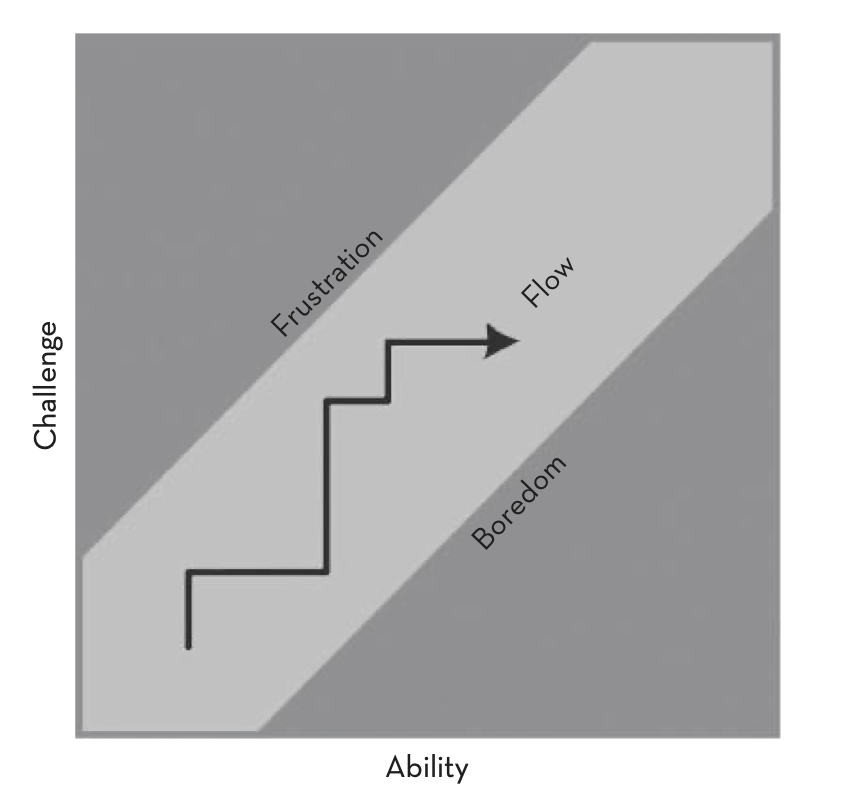
Image taken from Game Design Workshop by Tracy Fullerton.
NOTE: You should have a very solid GDD, if not, continue working on it, focusing on the mechanics, main game loop, main objective and the story of your game.
TIP: Prepapre a GitHub Project page and connect it to your repository (the repository for your game codebase). In there, you can create and manage a Kanban board and plan sprints.
Week 4 Tasks:
Level Design & UI
- Your team's Game Design Document (GDD) should be ready to be reviewed and graded (uploaded to Git).
- Start gathering assets: sprites, maps, background layouts, audio (loop, feedback sounds) and so on.
- Design/Build user interface (UI) for menus, HUD, and feedback. Start thinking about other functionalities like pause, save/load menu (if applicable to your game).
- Start implementing: player movement, interactions, and main objectives.
- Update GDD with a section that contains your group's work plan for weeks 5 through 9.
Weeks 5-9 Tasks:
Implementation Phase
Your team should follow the work plan you agreed upon in your GDD. In general terms, your team should:
- Program basic gameplay mechanics: player movement, interaction, and main objectives.
- Work on the implementation of your game systems (Reward, Feedback, Progression, Resources, etc).
- Test mechanics to ensure they are responsive.
Project Check-Ins
During weeks 5 through 9, I will be going to your groups to check on your progress towards the tasks you have in your work plan. The goal is to identify bottlenecks in your workflow (getting unstuck, decisions that need action), provide you with feedback early to guide your creative and development process. In these check-ins we will:
- Talk about how your game concept is being realized with your coding.
- Check the core loop and its implementation.
- Check your game mechanics and the scope of your game (to verify if the time constraints will make completion possible or if you need to adjust/change course).
I will also check how much you are advancing in the development:
- Prototype: is there a working prototype or partially playable level? What can you show-off from your game?
- Style and design: do the assets (or placeholders) communicate a consistent aesthetic? This will include: concept art, UI mockups, HUD, character or environment models, sound effects, background music.
Here are some questions for your team that are useful for your development process:
- What part of your game feels most complete? Least complete?
- What's the biggest unknown right now? What's something you're not sure how to fix/design/implement?
- How are you validating that your game is fun or engaging?
- What's your next immediate task you want to complete?
Show & Tell
During week 6, you will present to the class the general idea of your game and what your team have done so far. The objectives of these activity are as follow:
- Give you a checkpoint to articulate and refine your game concept, mechanics, and narrative before too much implementation work is done.
- Share peer feedback through the development process (one of the Agile principles).
- Encourage clarity of communication: saying a lot with very little space/time.
Presentation Guidelines
Each team will select one member to do the presentation, while the whole team prepares the presentation:
- One slide only: Use it to visually convey the essence of your game like title, key visuals (concept art, mockups, screenshots, or UI sketches, core loop, etc.). Add minimal text (keep it to bullet points or short phrases).
- 10-minute oral pitch: Cover (roughly in this order) your elevator pitch, core loop and mechanics, assets (visual or/and audio samples), narrative or story (if applicable), and briefly mention one or two things you are unsure about or would like feedback on (scope, UI, technical risks, game engine, etc.)
- Leave 2 minutes for feedback from the class or to answer your questions (the whole team can participate here).